


Travel Adapter w/ USB
 01-29-2013 | 11:24 AM
#1
Thread Starter
-
Joined: Feb 2012
Posts: 25
Likes: 0
 Travel Adapter w/ USB
I'd like to pick up a new travel adapter with at least one USB port on it. Can anyone recommend an adapter that you can plug a standard US plug into AND supply power to the USB outlet at the same time?
ie Macbook and iPhone (don't want to have to charge the iPhone thru the Macbook) at the same time.
Thanks!
ie Macbook and iPhone (don't want to have to charge the iPhone thru the Macbook) at the same time.
Thanks!
01-29-2013 | 02:10 PM
#3
Thread Starter
-
Joined: Feb 2012
Posts: 25
Likes: 0
Thanks, Lindy.
I've found this one while researching:
LP-PTCII – iPad Retina Display (4th Generation) - Macally Peripherals
Any further ideas are appreciated.
G
I've found this one while researching:
LP-PTCII – iPad Retina Display (4th Generation) - Macally Peripherals
Any further ideas are appreciated.
G
01-29-2013 | 02:34 PM
#4

Organizational Learning
Joined: Nov 2005
Posts: 4,948
Likes: 0
From: Directly behind the combiner
My solution to both problems is an adapter and a short extension cord.
The "All-in-ones" are sexy, but heavy. This thing might fall out of the socket:

This one probably won't:
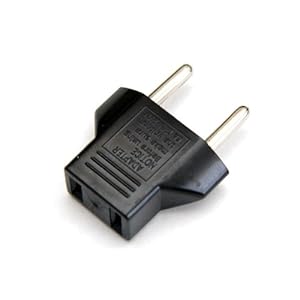
A set like this:
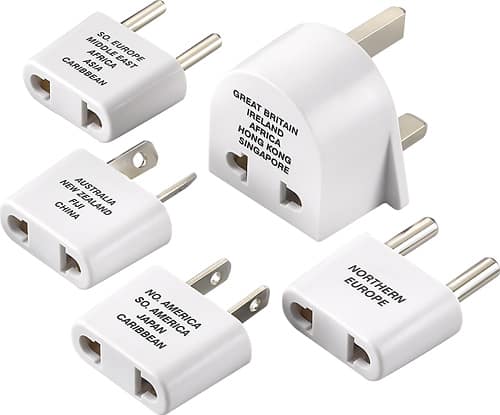
or this:
Standby ... this Forum doesn't allow more than 3 images in a single post.
REE-diculous ...
.
.
01-29-2013 | 02:37 PM
#5
Organizational Learning
Joined: Nov 2005
Posts: 4,948
Likes: 0
From: Directly behind the combiner
[Continued from previous post]
or this:


avoids the weight problem. In fact, when you consider where you're going on a given trip, you can probably get by with 1 or two from the first (white) set.
Plug a short standard extension cord into your adapter, and you've got multiple outlets for your laptop, your phone and tablet, and your personal wireless router.
.
or this:
avoids the weight problem. In fact, when you consider where you're going on a given trip, you can probably get by with 1 or two from the first (white) set.
Plug a short standard extension cord into your adapter, and you've got multiple outlets for your laptop, your phone and tablet, and your personal wireless router.
.

 01-29-2013 | 04:19 PM
#10

Gets Weekends Off
Joined: Oct 2006
Posts: 403
Likes: 0
From: 777 Capt
Since I hate carrying a bag of parts that I'll be guaranteed to lose, I've opted to go with an all-in-one solution. I carry two Travel Universal Adaptors - one for the laptop, and one for the Airport Express.
The adaptor is 3" x 1-1/2" x 1-3/4" and includes plugs for Europe, Asia, Japan, Australia (or the cockpit), and the U.S. It includes a surge protector and power light and can be plugged into any 110 or 220 outlet I've ever encountered. But, it does not include a USB plug.
Cost $3 to $5 at the 580 in Shanghai, the electronics market in Taipei, or many quicky marts across Asia including Penang. I'd post a photo or two, but I can't find the "Manage Attachments" button that is described in the FAQ's section, so I'm stumped on how to attach photos.
The adaptor is 3" x 1-1/2" x 1-3/4" and includes plugs for Europe, Asia, Japan, Australia (or the cockpit), and the U.S. It includes a surge protector and power light and can be plugged into any 110 or 220 outlet I've ever encountered. But, it does not include a USB plug.
Cost $3 to $5 at the 580 in Shanghai, the electronics market in Taipei, or many quicky marts across Asia including Penang. I'd post a photo or two, but I can't find the "Manage Attachments" button that is described in the FAQ's section, so I'm stumped on how to attach photos.

Thread
Thread Starter
Forum
Replies
Last Post
Flyin1500
Major
89
11-30-2008 09:10 PM


