


Travel Adapter w/ USB

 01-29-2013 | 05:01 PM
#12

Organizational Learning
Joined: Nov 2005
Posts: 4,948
Likes: 0
From: Directly behind the combiner

vBulletin (the software) allows attachments (and therefore there's an explanation of how to do it) but AirlinePilotForums does not. You need to "Insert" your image using vBulletin "code" or the "Insert Image" icon:

In order to insert the image, it needs to be on the internet with a URL, or Uniform Resource Locator. In most cases, if you find a picture on the internet, you can right-click it, select Properties, and then view the Address (URL). Copy it and insert it between image tags here, and voila, the image appears here.
For example, in order for me to insert the "Insert Image" image in this post, I right-clicked on the image that appears above this text-entry box in the "Reply to Thread" dialogue, than I clicked on Properties, then I right-clicked on the Address (URL), pressed Ctrl-A to ensure I had the entire URL highlighted, then pressed Ctrl-C to copy it to the clipboard.
Then I typed [img], then Ctrl-V to past the URL to my post, then [/img]
It looks like this:
[img]http://www.airlinepilotforums.com/images/editor/insertimage.gif[/img]
Had I chosen to click on the "Insert Image" icon to do the inserting part, I would have only needed to copy the URL into that dialogue box, and then edit it to make sure it doesn't have a double http://http://
Note -- this won't work with a picture you have on your own computer. If you have such a picture you want to share, you should first upload it to one of the free photo hosting sites, and then use the URL that it has there.
.
 01-29-2013 | 05:31 PM
#14

Gets Weekends Off
Joined: Oct 2006
Posts: 403
Likes: 0
From: 777 Capt
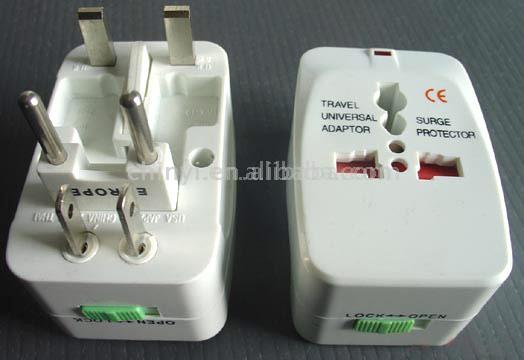
Thanks Tony. I'll try this. Here's a link to the Travel Universal Adaptor. Disregard the attached caption.
Google Image Result for http://www.asia.ru/images/target/photo/51528255/Travel_Universal_Adaptor_and_Surge_Protector.jpg
The two-pronged plugs for Japan at the bottom of the left image can be twisted to 45 degrees to work in Australia, or plug into the cockpit 110 plug next to the MD-11 cockpit door.
Google Image Result for http://www.asia.ru/images/target/photo/51528255/Travel_Universal_Adaptor_and_Surge_Protector.jpg
The two-pronged plugs for Japan at the bottom of the left image can be twisted to 45 degrees to work in Australia, or plug into the cockpit 110 plug next to the MD-11 cockpit door.
01-29-2013 | 05:56 PM
#15
Organizational Learning
Joined: Nov 2005
Posts: 4,948
Likes: 0
From: Directly behind the combiner
Thanks Tony. I'll try this. Here's a link to the Travel Universal Adaptor. Disregard the attached caption.
Google Image Result for http://www.asia.ru/images/target/photo/51528255/Travel_Universal_Adaptor_and_Surge_Protector.jpg
The two-pronged plugs for Japan at the bottom of the left image can be twisted to 45 degrees to work in Australia, or plug into the cockpit 110 plug next to the MD-11 cockpit door.
Google Image Result for http://www.asia.ru/images/target/photo/51528255/Travel_Universal_Adaptor_and_Surge_Protector.jpg
The two-pronged plugs for Japan at the bottom of the left image can be twisted to 45 degrees to work in Australia, or plug into the cockpit 110 plug next to the MD-11 cockpit door.
Close. You probably right-clicked the image, saw "Copy" as one of the options ... and wound up copying a link to the page instead of the address of the image. I followed the link and got the address of the image.
[img]http://www.asia.ru/images/target/photo/51528255/Travel_Universal_Adaptor_and_Surge_Protector.jpg[/img]
produces an image like this:
.
 01-29-2013 | 06:26 PM
#19
Organizational Learning
Joined: Nov 2005
Posts: 4,948
Likes: 0
From: Directly behind the combiner
I haven't found a picture of it, but I did find a picture of Model KD0011. It's white instead of brown -- immaterial -- but otherwise looks almost identical.

I like the fact that it actually fits in the socket, and when you twist it clockwise, it locks in place. When I'm plugging something important and expensive (like my laptop) into the wall, I like having the confidence that I'm actually hooking it up to the "correct two" of the three slots.
Here's a link to a description of the adapter:
Adapter
and a more detailed drawing of the adapter:
http://www.americandenki.co.jp/pdf/P6/P6M/KD0011.PDF
.
01-29-2013 | 07:08 PM
#20
Organizational Learning
Joined: Nov 2005
Posts: 4,948
Likes: 0
From: Directly behind the combiner
.

Thread
Thread Starter
Forum
Replies
Last Post
Flyin1500
Major
89
11-30-2008 09:10 PM


