Go Back  Airline Pilot Central Forums > Airline Pilot Forums > Major
ICrew and IPhone working? (DAL) >

ICrew and IPhone working? (DAL)

Search

Notices
Major Legacy, National, and LCC

ICrew and IPhone working? (DAL)

Thread Tools
 
Search this Thread
 
Old 09-02-2008 | 10:10 AM
  #1  
JBwillfly's Avatar
Thread Starter
On Reserve
 
Joined: Aug 2007
Posts: 20
Likes: 0
From: 757/767 FO
Default ICrew and IPhone working? (DAL)

ICrew is out but it doesn't seem to work on the iphone - was it supposed to work on Iphone???
Reply
Old 09-02-2008 | 10:37 AM
  #2  
LOBO's Avatar
Gets Weekends Off
 
Joined: Jan 2007
Posts: 326
Likes: 0
From: Right Seat over the CONUS
Default

iCrew does not work with Safari completely yet. It does work with Firefox. I don't have an iPhone but I think you are limited to Safari as your only web browser.
Reply
Old 09-02-2008 | 11:05 AM
  #3  
DAL4EVER's Avatar
Gets Weekends Off
 
Joined: Mar 2007
Posts: 1,597
Likes: 0
From: 88B - Loud Pipes Save Lives
Default

Correct. It does work with Firefox and is a vast improvement for Mac users over the old ecrew.
Reply
Old 09-02-2008 | 04:04 PM
  #4  
Gunfighter's Avatar
Gets Weekends Off
1M Airline Miles
On Reserve
Gets Weekends Off
50 Countries Visited
 
Joined: Apr 2007
Posts: 5,632
Likes: 656
Default

I can log in to Deltanet, but Travelnet and iCrew won't load on the iPhone. iPhone support wasn't part of the plan for the initial launch of iCrew. I'm not sure when/if it will work on the iPhone.
Reply
Old 09-02-2008 | 05:40 PM
  #5  
slinky's Avatar
Gets Weekends Off
 
Joined: Jul 2007
Posts: 145
Likes: 0
From: 7ER B
Default

Originally Posted by Gunfighter
I can log in to Deltanet, but Travelnet and iCrew won't load on the iPhone. iPhone support wasn't part of the plan for the initial launch of iCrew. I'm not sure when/if it will work on the iPhone.
Travel net is an easy fix. Log on to delta net and go to travel net. When you get to the screen with the "I accept" that causes you problems, push the button to go to the Iphone start page, you know the button on the bottom that you use to wake it up. Then go to "SETTINGS". Scroll down to "Safari" and turn off java scripting. This will allow you to get past the "I accept" screen. You will now be in travel net.

To list for a flight you will need to turn on java scripting again.
You will have to play with it a bit but it will work.

Slinky

Reply
Old 09-02-2008 | 06:21 PM
  #6  
SJF15E's Avatar
Line Holder
 
Joined: Mar 2007
Posts: 76
Likes: 0
From: SWA Newbie
Default

By the way, if any of you DAL guys are looking for the link to iCrew. It is at the VERY bottom of the flight ops page on the left side. They aren't exactly trying to draw attention to it.
Reply
Old 09-02-2008 | 06:25 PM
  #7  
Justdoinmyjob's Avatar
Looking for a laugh
 
Joined: Feb 2008
Posts: 4,099
Likes: 0
Default

Just because it is called icrew, doesn't mean it has any compatibility with apple products. DAL doesn't believe that there is any other OS out there besides Microsoft.
Reply
Old 05-13-2009 | 01:59 PM
  #8  
FlyingViking's Avatar
Gets Weekends Off
 
Joined: Sep 2007
Posts: 931
Likes: 0
From: B-7ER JFK
Default

Has this been taken care of by now?
Reply
Old 05-13-2009 | 05:44 PM
  #9  
Justdoinmyjob's Avatar
Looking for a laugh
 
Joined: Feb 2008
Posts: 4,099
Likes: 0
Default

Originally Posted by SJF15E
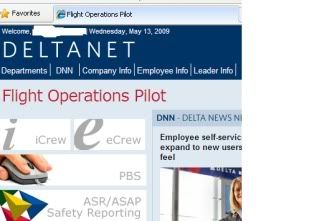
By the way, if any of you DAL guys are looking for the link to iCrew. It is at the VERY bottom of the flight ops page on the left side. They aren't exactly trying to draw attention to it.

It's also on the top left next to the ecrew prompt. This is what I see when I log in.
Reply
Old 05-14-2009 | 09:28 AM
  #10  
FlyingViking's Avatar
Gets Weekends Off
 
Joined: Sep 2007
Posts: 931
Likes: 0
From: B-7ER JFK
Default

is there any problems using Iphone with dlnet anymore? What about Icrew? Travelnet?

Thinking about swapping to Iphone and need to know if it works for the intended purpose. If anyone also uses a logbook on Iphone that is compatible with Logbook pro and will calculate pay, I am very interested in learning more about it.
Reply

Posting Rules
You may not post new threads
You may not post replies
You may not post attachments
You may not edit your posts

BB code is On
Smilies are On
[IMG] code is On
HTML code is Off
Trackbacks are On
Pingbacks are On
Refbacks are On


Your Privacy Choices